If you have questions on using HomeManage please visit our HomeManage Videos Page which contains many videos showing how to use HomeManage.
The new Attachments folder is used to store files that should be included in backups. You can copy attachment files to this Attachments folder and then link them to your assets going forward.
Attachments in the attachment folder will be included in your backups. We will have a feature that copies previous existing attachment files to this folder in the next week or 2.
It is not mandatory to store attachment files in the Attachments folder you can keep doing it the previous way.
- I get a "Code In Use" error when trying to activate HomeManage.
- I misplaced (or hav'ent received) my code and need to have it sent to me.
“The microsoft jet database engine cannot open the file D:\Assets.mdb.It is already opened exclusively by another user.or you need permission to view its data (3051) ”No one but me has the program or uses it. Do you know what it going on?.
Possible solutions:
1/ Make sure your anti-virus is not setting the folder to read-only. We had a couple users who had this happen.
2/ Follow the instructions here to remove the read-only attribute from the folder
The registration dialog will show only 1 day left. If you simply wait a few seconds the 1st window will be replaced with
a second registration window that shows an accurate count of the days left in the trial.
We have no idea why this software is designed this way, it causes confusion for many users.
a) Open AVG and go to: Options > Advanced Settings > Exceptions (left-side) Add Exception.
b) Browse for AssetMng.exe in \\Program Files(x86)\HomeManage
c) Click OK twice to add it to the Exceptions list.
Can you select FILE -> Goto My Images Folder... from the main menu. Does the program open a folder in which you have read / write access? Do you see any JPG files in the folder. Every time you add an image to an asset, then click OK, the program should create a new JPG file in this folder, do you see this happening? If not, either you don't have permissions to write to the folder or perhaps your anti-virus is preventing the file from being saved due to a false-positive.
A possible work-around solution is to run HomeManage as an Administrator. Do this by right mouse-click on the program icon and select "Run as Administrator" from the popup menu. If you can now save images it means you do not have permissions to write files to the images folder. Do a Google search for "how to change folder permissions windows 10". Or whatever version of Windows you are using. You should get several good links on how to change the folder permissions.
Activate the program on the new computer with the same activation code that was used on the old computer.
HomeManage should be activated on both computers with the same activation code.
1) On your older computer, run HomeManage and do an Internet backup (File > Backup to Internet..) from the main menu.
2) Switch to your new computer, run HomeManage and do an Interet restore (File > Restore Internet Backup..) from the main menu.
3) EXIT HomeManage and then run the program again. Your data & images should now appear.
b) In the Backup Save As you can change the name of the backup file or accept the default name
c) then select (File > Manage Backup Files from the main menu. d) Take the most recent Zip file and transfer it to your new machine. You can do this by copying the ZIP file to a USB or external drive..or perhaps copying it to a shared folder on your network that the new machine has access to.
e) Install and run HomeManage on your new machine.
f) Select (File > Restore..) from the main menu.
g) Select the ZIP file you backed up in the previous step and press the OPEN button.
When I tried to start it October 3rd, it presented the License Activation screen. When I clicked the Activate Purchased License Code, it gave me an Activation Error saying:
"There are network adapters on the system that are disabled and TurboActivate couldn't read their hardware properties (even after trying and failing to enable the adapters automatically).
Enable the network adapters, re-run this wizard, and TurboActivate will be able to "remember" the adapters even if the adapters are disabled in the future. "
I have uninstalled and reinstalled the program, disabled my antivirus and reset my network adapters but continue to get the same error message.
We use a 3rd party software for the licensing of HomeManage. This annoying error seems to happen once in awhile to customers.
Do any of the items on this page fix the error:
https://wyday.com/limelm/help/faq/#disabled-adapters
If not, how about this solution found by a customer:
It was caused by the receiver for my Microsoft Xbox Elite controller. The receiver was plugged into one of my computer's USB ports. It was showing up in my Device Manager in the Network Adapters section. It indicated that it was disconnected, which I figured was because the controller was turned off. Anyways, after trying most everything else I could think of, I finally tried unplugging the receiver. I then opened HomeManage and was able to activate it online without any problem.
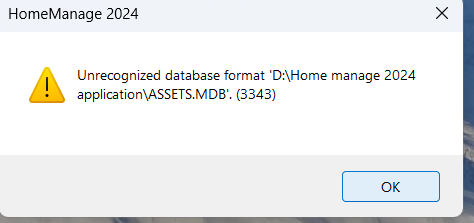
If you do not have Microsoft Access you can ZIP the ASSETS.MDB file and email it to us at: techsupport@libertystreet.com we will run repair command Here and return the file to you.
select Actions > Empty 'Deleted Items' folder to completely remove them from the data file.
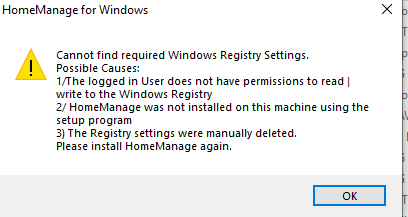
is required to run the program. See the link below for information on how to set the permissions using REGEDIT.
https://community.sophos.com/kb/en-us/13811
Enable Read / Write permission to: HKEY_CURRENT_USER\Software\Liberty Street Software\HomeManage To solve this problem, move the ASSETS.MDB file from C:\PROGRAM FILES(X86)\HOMEMANAGE to another folder MY DOCUMENTS\HOMEMANAGE\DATA is usually a good choice. After copying the ASSETS.MDB file to the new folder, make sure it is no longer in the C:\PROGRAM FILES(X86)\HOMEMANAGE folder or your will get the same error. Run HomeManage again, you should now see a message box, saying HomeManage cannot find the data file. Click the YES button and navigate to the new folder where you have moved the data file. MY DOCUMENTS\HOMEMANAGE\DATA in the example above.
select Actions > Empty 'Deleted Items' folder to completely remove them from the data file.
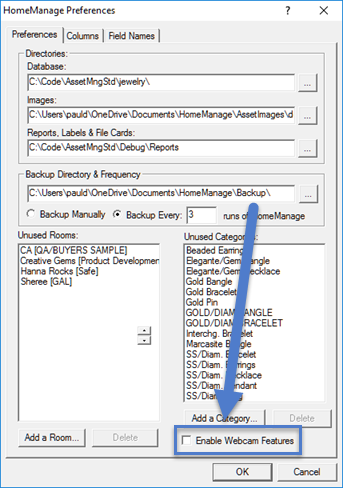
This can usually be solved by un-checking" the Use Webcam check box in the program preferences (TOOLS > PREFERENCES)
a) Right mouse-click on the program icon and select "Run As Administrator" from the popup menu.
b) Enter the registration information for the program.
c) Run the program again normally.
d) If the problem persists can you try running as "Run As Administrator" whenever you run the program